




对应https://vectorbt.dev/getting-started/resources/的第一篇文章
Performance analysis of Moving Average Crossover,比特币,双均线,参数探测和可视化
需要对python工具包,pandas的series和dataframe有大致了解,否则代码的阅读会比较吃力。
文章概述
一共四部分
第一部分:数据查询和可视化
第二部分:Single window combination,单窗口组合
第三部分:Multiple window combinations,多参数组合测试
第四部分:Strategy comparison,策略比较
第一部分:数据查询和可视化
主要用来验证,数据查询没问题,需要关注复权情况,避免数据没做复权处理,避免分红,配股引入的回测偏差。
数据查询: ohlcv_wbuf=dbtools.MySQLData.download('510050.XSHG').get() # 自带工具类查询
数据筛选和过滤 # Create a copy of data without time buffer wobuf_mask = (ohlcv_wbuf.index >= start_date) & (ohlcv_wbuf.index <= end_date) # mask without buffer 计算指标时需要冗余数据 ohlcv = ohlcv_wbuf.loc[wobuf_mask, :]
绘制蜡烛图:ohlcv.vbt.ohlcv.plot().show_svg()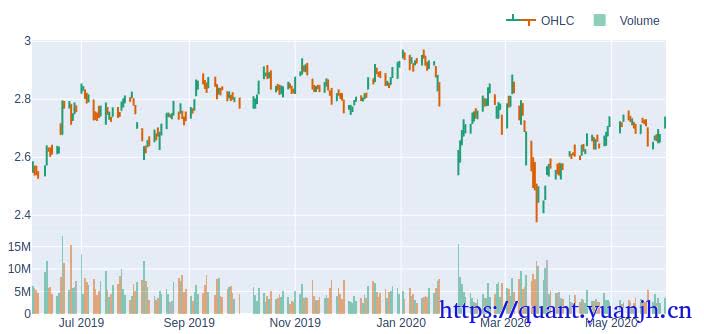
第二部分:Single window combination,单窗口组合
观察指标的计算和信号的计算,触发等是否符合自己的设计思路,以及那些行情表现好,那些表现差,表现差的能否屏蔽或识别,过滤掉。
确保无任何空值: # there should be no nans after removing time buffer assert (~fast_ma.ma.isnull().any())
单次金叉:fast_ma.ma_crossed_above(slow_ma)
绘制行情,指标,交易信号图: fig = ohlcv['Open'].vbt.plot(trace_kwargs=dict(name='Price')) fig = fast_ma.ma.vbt.plot(trace_kwargs=dict(name='Fast MA'), fig=fig) fig = slow_ma.ma.vbt.plot(trace_kwargs=dict(name='Slow MA'), fig=fig) fig = dmac_entries.vbt.signals.plot_as_entry_markers(ohlcv['Open'], fig=fig) fig = dmac_exits.vbt.signals.plot_as_exit_markers(ohlcv['Open'], fig=fig) fig.show_svg()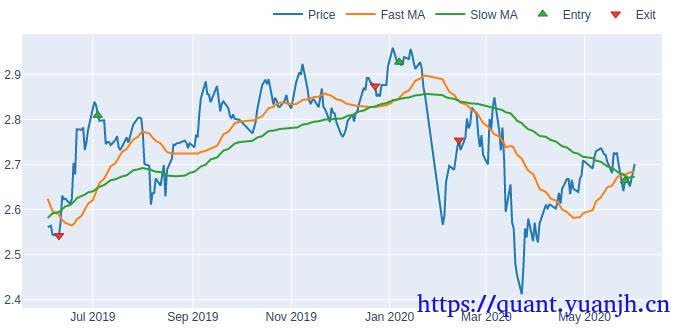
信号评估:dmac_entries.vbt.signals.stats(settings=dict(other=dmac_exits))
Start 2019-06-03 00:00:00+00:00End 2020-06-01 00:00:00+00:00Period 243 #开始-结束 交易日个数Total 3 #交易次数(完整买卖,最后没卖出信号,自动卖出)Rate [%] 1.234568 #todoTotal Overlapping 0 #重叠率,有重叠大概率说明买卖信号组合存在问题Overlapping Rate [%] 0.0First Index 2019-07-04 00:00:00+00:00 #推算应该是首次交易日Last Index 2020-05-26 00:00:00+00:00Norm Avg Index [-1, 1] 0.123967 #todoDistance -> Other: Min 21.0 #最小持仓区间,下图A标记距离Distance -> Other: Max 116.0 #最大持仓区间Distance -> Other: Mean 68.5 #平均持仓区间Distance -> Other: Std 67.175144Total Partitions 3 #todoPartition Rate [%] 100.0 #todoPartition Length: Min 1.0Partition Length: Max 1.0Partition Length: Mean 1.0Partition Length: Std 0.0Partition Distance: Min 90.0 #2次买入信号最小间距,下图B标记距离Partition Distance: Max 126.0 #2次买入信号最大间距Partition Distance: Mean 108.0Partition Distance: Std 25.455844dtype: object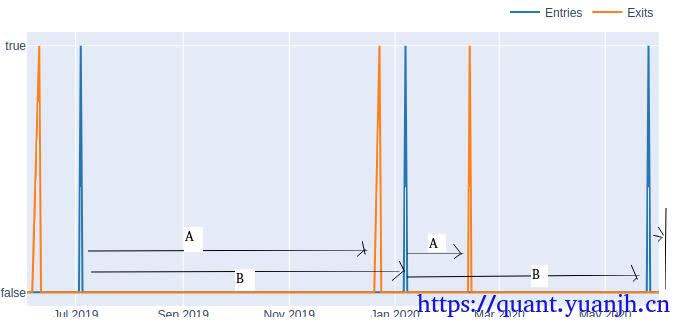
买卖信号图:(上图所示) # Plot signals fig = dmac_entries.vbt.signals.plot(trace_kwargs=dict(name='Entries')) dmac_exits.vbt.signals.plot(trace_kwargs=dict(name='Exits'), fig=fig).show_svg()
交易结果分析: # Build partfolio, which internally calculates the equity curve
# Volume is set to np.inf by default to buy/sell everything # You don't have to pass freq here because our data is already perfectly time-indexed dmac_pf = vbt.Portfolio.from_signals(ohlcv['Close'], dmac_entries, dmac_exits)
# Print stats print(dmac_pf.stats())Start 2019-06-03 00:00:00+00:00End 2020-06-01 00:00:00+00:00Period 243Start Value 10000.0 #期初资金End Value 9489.187544 #期末资金Total Return [%] -5.108125 #总收益率Benchmark Return [%] 6.669267 #基准回报率Max Gross Exposure [%] 100.0 #最大总风险,todoTotal Fees Paid 121.927248 #总费用Max Drawdown [%] 14.772497 #最大回撤Max Drawdown Duration 138.0 #回撤持续区间Total Trades 3 #总交易Total Closed Trades 2 #todoTotal Open Trades 1 #todoOpen Trade PnL 168.683037 #todoWin Rate [%] 50.0 #胜率Best Trade [%] 0.77486 #0.77%收益率Worst Trade [%] -7.528611 #-7.5%收益率Avg Winning Trade [%] 0.77486 #盈利交易平均收益Avg Losing Trade [%] -7.528611 #亏损交易平均收益Avg Winning Trade Duration 116.0 #盈利交易持有平均周期Avg Losing Trade Duration 21.0 #亏损交易持有平均周期Profit Factor 0.102133 #todoExpectancy -339.747747 #tododtype: object
交易历史明细单和可视化 # Plot trades print(dmac_pf.trades.records) dmac_pf.trades.plot().show_svg()
id col size entry_idx entry_price entry_fees exit_idx exit_price exit_fees pnl return direction status parent_id0 0 0 3553.638170 22 2.807000 24.937656 138 2.842875 25.256373 77.292741 0.007749 0 1 01 1 0 3418.716194 148 2.940332 25.130406 169 2.733150 23.359660 -756.788234 -0.075286 0 1 12 2 0 3469.538407 238 2.679682 23.243153 242 2.735000 0.000000 168.683037 0.018143 0 0 2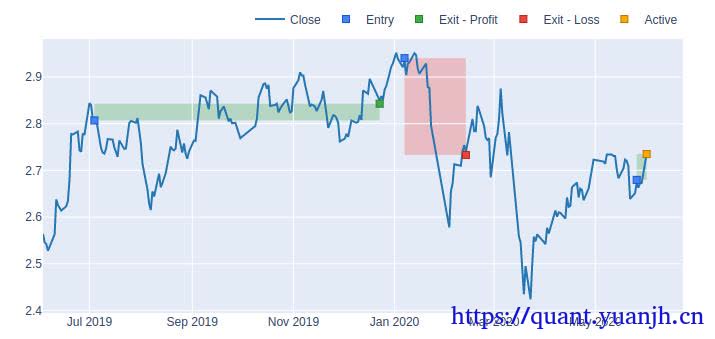
多组绩效同列比对 # Equity fig = dmac_pf.value().vbt.plot(trace_kwargs=dict(name='Value (DMAC)')) hold_pf.value().vbt.plot(trace_kwargs=dict(name='Value (Hold)'), fig=fig).show_svg()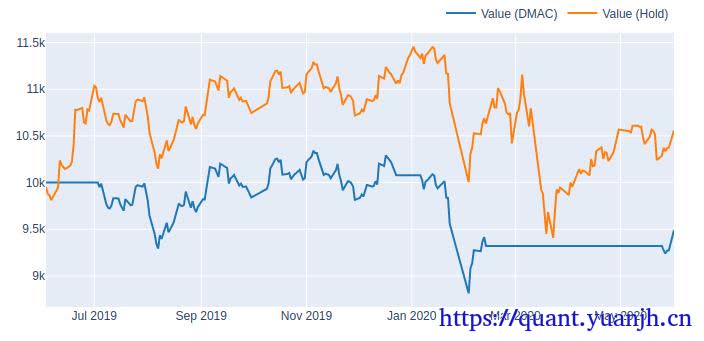
可视化动态dashboard调参: windows_slider.observe(on_value_change, names='value') on_value_change({'new': windows_slider.value})
dashboard = widgets.VBox([ widgets.HBox([widgets.Label('Fast and slow window:'), windows_slider]), dmac_img, metrics_html ]) dashboard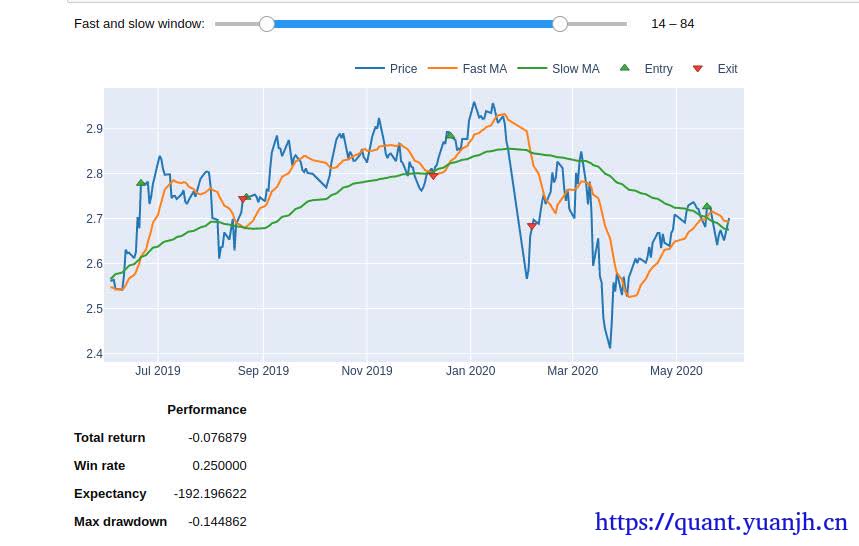
第三部分:Multiple window combinations,多参数组合测试
对策略涉及的参数进行提取,并测试这些参数组合,获得最佳的参数组合。
组合测试: # Pre-calculate running windows on data with time buffer fast_ma, slow_ma = vbt.MA.run_combs( ohlcv_wbuf['Open'], np.arange(min_window, max_window+1), r=2, short_names=['fast_ma', 'slow_ma']) print(fast_ma.ma.shape) print(slow_ma.ma.shape) print(fast_ma.ma.columns) print(slow_ma.ma.columns) (978, 4851) (978, 4851) Int64Index([ 2, 2, 2, 2, 2, 2, 2, 2, 2, 2, ... 96, 96, 96, 96, 97, 97, 97, 98, 98, 99], dtype='int64', name='fast_ma_window', length=4851) Int64Index([ 3, 4, 5, 6, 7, 8, 9, 10, 11, 12, ... 97, 98, 99, 100, 98, 99, 100, 99, 100, 100], dtype='int64', name='slow_ma_window', length=4851) 这里需要注意的是4851怎么来的? 2:3->100(98) 3:4->100(97) 98:99->10(2) 99:100->100(1) 组合个数:(98+1)*98/2=4851 可以发现:原始的fast_ma.ma只有一个维度,长度978的float序列,现在多出一个维度,目前的ma多出的维度 fast_ma.ma.columns Int64Index([ 2, 2, 2, 2, 2, 2, 2, 2, 2, 2, ... 96, 96, 96, 96, 97, 97, 97, 98, 98, 99], dtype='int64', name='fast_ma_window', length=4851)
组合测试的信号生成: 表面和单指标相同 dmac_entries = fast_ma.ma_crossed_above(slow_ma) print(dmac_entries.columns) # the same for dmac_exits MultiIndex([( 2, 3), ( 2, 4), ( 2, 5), ( 2, 6), ( 2, 7), ( 2, 8), ( 2, 9), ( 2, 10), ( 2, 11), ( 2, 12), ... (96, 97), (96, 98), (96, 99), (96, 100), (97, 98), (97, 99), (97, 100), (98, 99), (98, 100), (99, 100)], names=['fast_ma_window', 'slow_ma_window'], length=4851) 这里需要注意的fast_ma和slow_ma的columns本都是单个int取值,crossed后自动,由于columns不同组合,自动生成multiindex了。组合测试回测评估 # Build portfolio dmac_pf = vbt.Portfolio.from_signals(ohlcv['Close'], dmac_entries, dmac_exits) dmac_perf = dmac_pf.deep_getattr(metric) #metric = 'total_return'
print(dmac_perf.shape) print(dmac_perf.index) (4851,)MultiIndex([( 2, 3), ( 2, 4), ( 2, 5), ( 2, 6), ( 2, 7), ( 2, 8), ( 2, 9), ( 2, 10), ( 2, 11), ( 2, 12), ... (96, 97), (96, 98), (96, 99), (96, 100), (97, 98), (97, 99), (97, 100), (98, 99), (98, 100), (99, 100)], names=['fast_ma_window', 'slow_ma_window'], length=4851) 可见:dmac_perf其实完成column转index,同时猜测如果metric含有多个取值,那么dmac_perf.columns也会增加。
最佳参数组: # Calculate performance of each window combination dmac_perf = dmac_pf.deep_getattr(metric) #metric = 'total_return' dmac_perf.idxmax()2维参数热力图可视化: # Convert this array into a matrix of shape (99, 99): 99 fast windows x 99 slow windows dmac_perf_matrix = dmac_perf.vbt.unstack_to_df(symmetric=True, index_levels='fast_ma_window', column_levels='slow_ma_window') dmac_perf_matrix.vbt.heatmap( xaxis_title='Slow window', yaxis_title='Fast window').show_svg()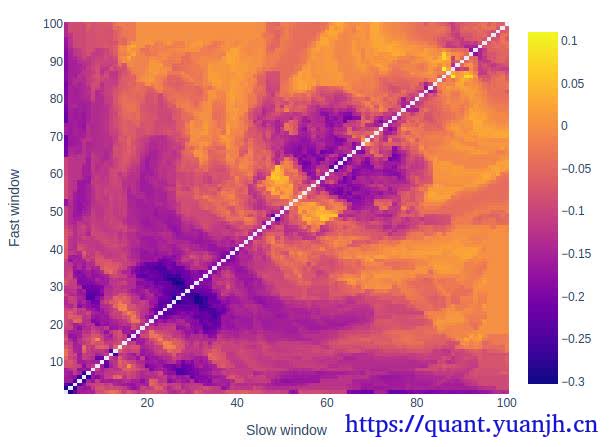
交互式图表,以及gif动图的生成,有点复杂了,感觉用处不大,不深究
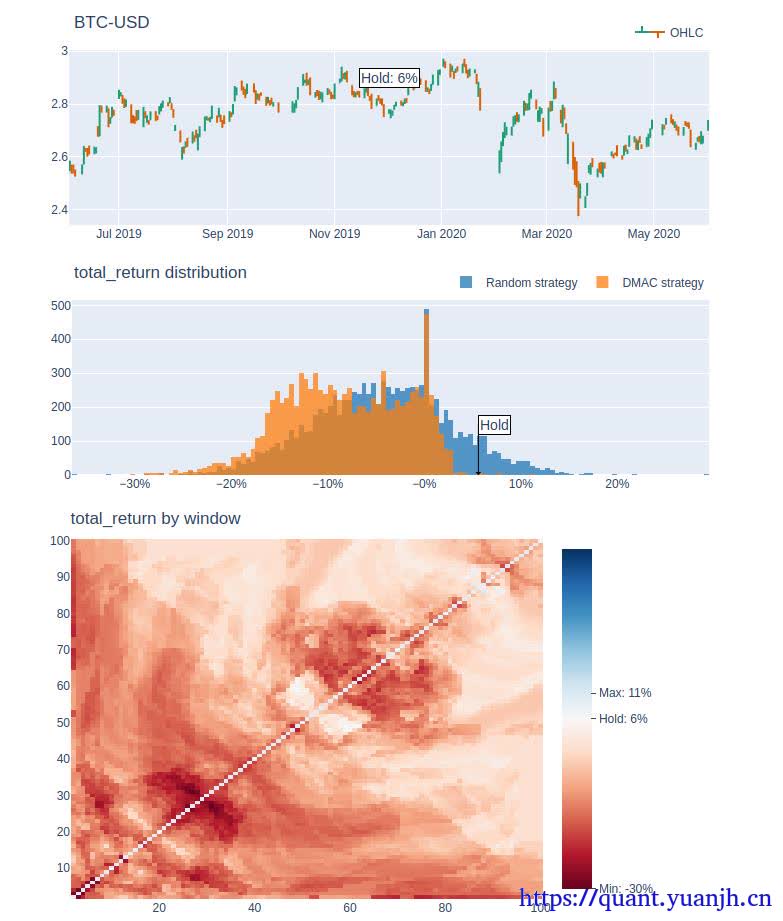
第四部分:Strategy comparison,策略比较
这一部分不是很懂干嘛用的,这个步骤的目标是什么,多个滚动时间窗口平均更能说明策略好坏?
规避起始-结束时间区间,引入的回测误差,将策略运行周期也看做策略参数,比如,fast-slow-range,5-10-40,就是5日10日的双均线策略,在40日为一个单元情况下的收益分布。
但个人感觉类似40日这样可比性不强,由于波动性随着时间大概率有变化的,所以震荡市向单边市场靠近时,必然导致统计数据不准的情况。所以我也不是非常肯定,这种测试是用来说明什么的。
简单来说,这种策略测试,有意义,但意义不大,只能笼统看做是对策略开始看时间的敏感性测试。或是策略对单笔交易鲁棒性体现指标。
时间区间回测: open_roll_wbuf, split_indexes = ohlcv_wbuf['Open'].vbt.range_split( range_len=(ts_window + time_buffer).days, n=ts_window_n)
print(open_roll_wbuf.shape) print(open_roll_wbuf.columns) (465, 50) Int64Index([0, 1, 2, 3, 4, 5, 6, 7, 8, 9, 10, 11, 12, 13, 14, 15, 16, 17, 18, 19, 20, 21, 22, 23, 24, 25, 26, 27, 28, 29, 30, 31, 32, 33, 34, 35, 36, 37, 38, 39, 40, 41, 42, 43, 44, 45, 46, 47, 48, 49], dtype='int64', name='split_idx') 比较容易理解,原始的1列数据,copy出50列,列索引从0-49。
# This will calculate moving averages for all date ranges and window combinations fast_ma_roll, slow_ma_roll = vbt.MA.run_combs( open_roll_wbuf, np.arange(min_window, max_window+1), r=2, short_names=['fast_ma', 'slow_ma'])
print(fast_ma_roll.ma.shape) print(fast_ma_roll.ma.columns) (465, 242550) # 4851*50=242550 MultiIndex([( 2, 0), ( 2, 1), ( 2, 2), ( 2, 3), ( 2, 4), ( 2, 5), ( 2, 6), ( 2, 7), ( 2, 8), ( 2, 9), ... (99, 40), (99, 41), (99, 42), (99, 43), (99, 44), (99, 45), (99, 46), (99, 47), (99, 48), (99, 49)], names=['fast_ma_window', 'split_idx'], length=242550) 从原始的常规columns数字索引,变成数字pair的二维multi索引。 # Generate crossover signals dmac_entries_roll = fast_ma_roll.ma_crossed_above(slow_ma_roll) print(dmac_entries_roll.columns) MultiIndex([( 2, 3, 0), ( 2, 3, 1), ( 2, 3, 2), ( 2, 3, 3), ( 2, 3, 4), ( 2, 3, 5), ( 2, 3, 6), ( 2, 3, 7), ( 2, 3, 8), ( 2, 3, 9), ... (99, 100, 40), (99, 100, 41), (99, 100, 42), (99, 100, 43), (99, 100, 44), (99, 100, 45), (99, 100, 46), (99, 100, 47), (99, 100, 48), (99, 100, 49)], names=['fast_ma_window', 'slow_ma_window', 'split_idx'], length=242550) 信号由原来的2维pair变成3维pair。
# Calculate the performance of the DMAC Strategy applied on rolled price # We need to specify freq here since our dataframes are not more indexed by time dmac_roll_pf = vbt.Portfolio.from_signals(close_roll, dmac_entries_roll, dmac_exits_roll, freq=freq)
dmac_roll_perf = dmac_roll_pf.deep_getattr(metric)
print(dmac_roll_perf.shape) print(dmac_roll_perf.index) (242550,) MultiIndex([( 2, 3, 0), ( 2, 3, 1), ( 2, 3, 2), ( 2, 3, 3), ( 2, 3, 4), ( 2, 3, 5), ( 2, 3, 6), ( 2, 3, 7), ( 2, 3, 8), ( 2, 3, 9), ... (99, 100, 40), (99, 100, 41), (99, 100, 42), (99, 100, 43), (99, 100, 44), (99, 100, 45), (99, 100, 46), (99, 100, 47), (99, 100, 48), (99, 100, 49)], names=['fast_ma_window', 'slow_ma_window', 'split_idx'], length=242550)数据格式转换: # Unstack this array into a cube dmac_perf_cube = dmac_roll_perf.vbt.unstack_to_array( levels=('fast_ma_window', 'slow_ma_window', 'split_idx'))
print(dmac_perf_cube.shape) (98, 98, 50)绘制fast-slow windows回测结果图 # For example, get mean performance for each window combination over all date ranges heatmap_index = dmac_roll_perf.index.levels[0] heatmap_columns = dmac_roll_perf.index.levels[1] # np.nanmean取平均,所以最后是二维图而非立方体,https://www.python100.com/html/96013.html heatmap_df = pd.DataFrame(np.nanmean(dmac_perf_cube, axis=2), index=heatmap_index, columns=heatmap_columns) heatmap_df = heatmap_df.vbt.make_symmetric()
heatmap_df.vbt.heatmap( xaxis_title='Slow window', yaxis_title='Fast window', trace_kwargs=dict(zmid=0, colorscale='RdBu')).show_svg()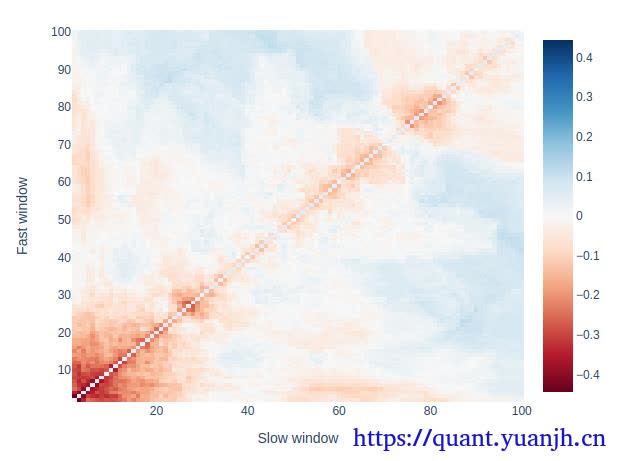
查看特定fast-slow windows参数组合的收益分布
# Or for example, compare a pair of window combinations using a histogramwindow_comb1 = (10, 22)window_comb2 = (73, 77)
# Get index of each window in strat_cubefast1_idx = np.where(heatmap_df.index == window_comb1[0])[0][0]slow1_idx = np.where(heatmap_df.columns == window_comb1[1])[0][0]fast2_idx = np.where(heatmap_df.index == window_comb2[0])[0][0]slow2_idx = np.where(heatmap_df.columns == window_comb2[1])[0][0]
print(fast1_idx, slow1_idx, fast2_idx, slow2_idx)
dmac_comb1_perf = dmac_perf_cube[fast1_idx, slow1_idx, :]dmac_comb2_perf = dmac_perf_cube[fast2_idx, slow2_idx, :]
pd.DataFrame({str(window_comb1): dmac_comb1_perf, str(window_comb2): dmac_comb2_perf}).vbt.histplot().show_svg()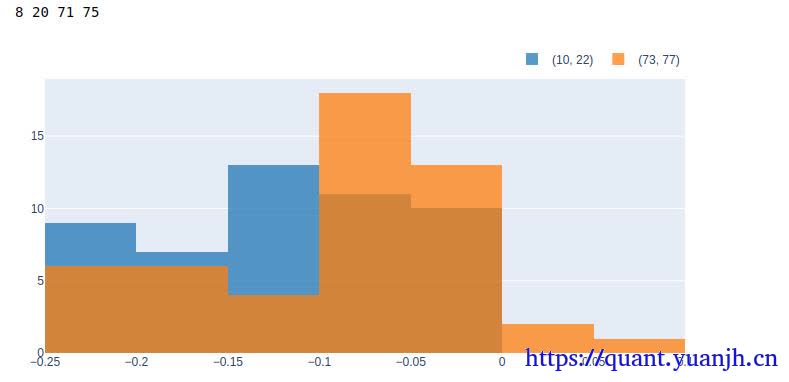
由于每个参数对应50个不同的时间range,所以直方图列取值sum=50,可以近似看做特定参数组合的收益分布情况。
todo:补充,可以绘制各个参数的收益分布情况,可能更明显,选择高均值,低方差的参数组合,只是数据可能较多,100*100个组合。
可以笼统-》细化的思路处理,比如slow:1-》100,分成10个区间,1-》10,10-》20,fast也是类似的,这样可以找出平均收益最大的格子,锁定slow-fast区间,比如slow[10,20],fast:[20-30],之后再二次探测,类似迭代找局部最优解的思路。
用双均线策略和单纯的持有,以及随机买卖策略回测结果比对
pd.DataFrame({ 'Random Strategy': rand_roll_perf, 'Hold Strategy': hold_roll_perf, 'DMAC Strategy': dmac_roll_perf,}).vbt.histplot( xaxis_title=metric, yaxis_title='Cumulative # of tests', trace_kwargs=dict(cumulative_enabled=True)).show_svg() # cumulative_enabled累加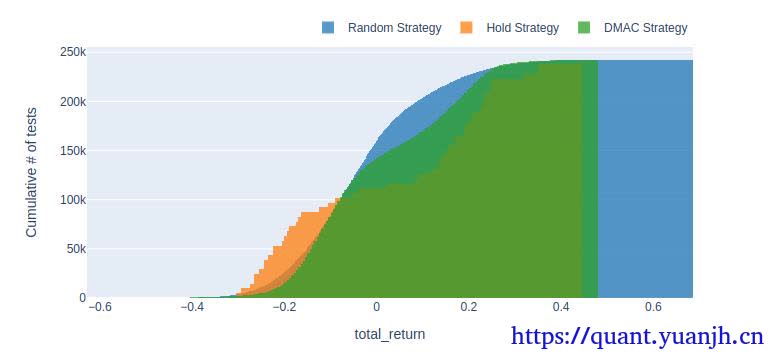
首先纵轴的250k是什么?
print(rand_roll_perf.shape)(242550,)就是之前的4851*50=242550其次累积图,有点让人看不懂,不妨改为非累积
pd.DataFrame({ 'Random Strategy': rand_roll_perf, 'Hold Strategy': hold_roll_perf, 'DMAC Strategy': dmac_roll_perf,}).vbt.histplot( xaxis_title=metric, yaxis_title='Cumulative # of tests', trace_kwargs=dict(cumulative_enabled=False)).show_svg()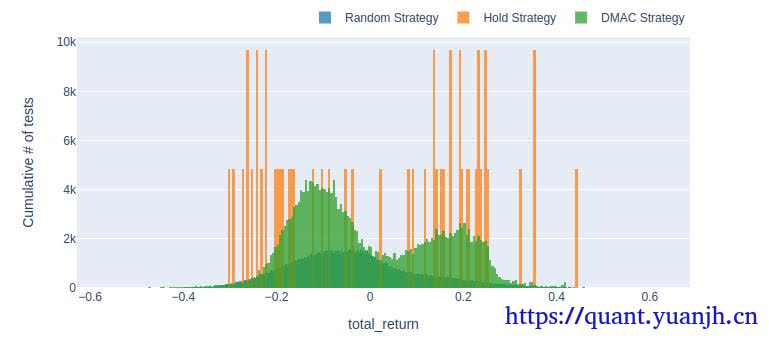
颜色上会有遮挡,hold策略收益分布较极端,dmac绿色部分,random对应绿色内部的深色部分。
这个能体现什么呢?也不是很懂,怎么评估优劣?,目前我也没看太懂。
时间维度绘制三种策略的收益变化图(平均收益)
pd.DataFrame({ 'Random strategy': rand_roll_perf.groupby('split_idx').mean(), 'Hold strategy': hold_roll_perf.groupby('split_idx').mean(), 'DMAC strategy': dmac_roll_perf.groupby('split_idx').mean()}).vbt.plot( xaxis_title='Split index', yaxis_title='Mean %s' % metric).show_svg()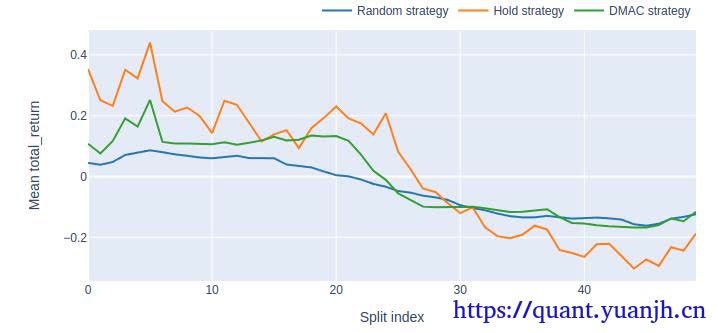
能体现什么信息呢?
大致体现随着时间窗口移动,策略整体有效性(由于上面用的mean平均收益,dmac_roll_perf.groupby(‘split_idx’).mean(),所以可以认为双均线策略的综合有效性)。
不过,由于不同参数的策略其实是完全不同的策略,所以感觉这组数据用来评估策略-时间关联性的说服力并不强。
下面是特定参数组合的例子。大致看出各参数组合策略收益稳定性。这个还是有一定说服力的。
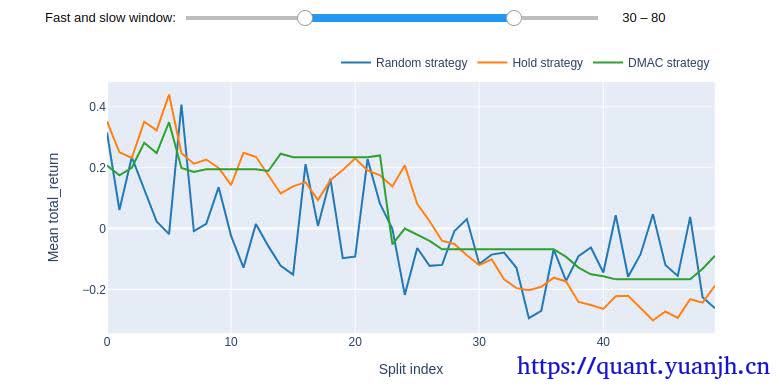
这个重点观察
先选定一组fast-slow windows参数
首先,思考下,本周一启动策略和下周一启动策略,那么策略执行结果相同么?肯定不同,如果本周触发交易信号,则由于交易序列不同,所以形成trads历史不同,最终收益自然也不同(策略对起始时间的敏感性,策略对单笔收益的鲁棒性,是否依靠某一笔收益取得正向结果)。由于我们不能乐观的估计,目前启动策略就一定位于高点上,所以需要采用窗口回测(windows=n)方法,得到一组收益数据。那么这组收益数据,就可以看做,是策略运行一个windows单位的最终收益分布。最优收益,最差收益,平均收益,以及收益稳定性。
所以重点关注这组fast-slow windows参数下:
01,理想的曲线时,都在0轴上方,越向上越好,均值大,波动小
02,是否稳定0轴上方, 如果0附近随机波动,说明类似掷筛子,如果有正均值还行,负均值就不理想了。
03,最高,最低点距离,希望波动小,波动大了,很可能今天进去,恰好赶上最差的周期,windows天后,悲提最差收益。
04,收益权限最高点,对应windows时间区间行情长相,说明策略对这一类行情有偏好。想办法筛选出。
同理,收益最低点,对应windows时间区间行情长相,说明策略对这一类行情有排斥。想办法过滤掉。
部分信息可能已经过时